What's life without a little texture?
Let's play the "Picture-It" game. Picture your world – dynamic, reactive, synapse-firing. Now smooth that all over. Everything feels the same as the last thing. The next thing will all but surely feel the same, too. That'd be pretty boring, if we could be honest.
What to do to prevent such tedium? Add a little variance, a little rhythm, a little texture. Today, we're gonna make like the Mels and spice up our life. Our main ingredient? The latest and hottest from MXR. Let's talk about it.
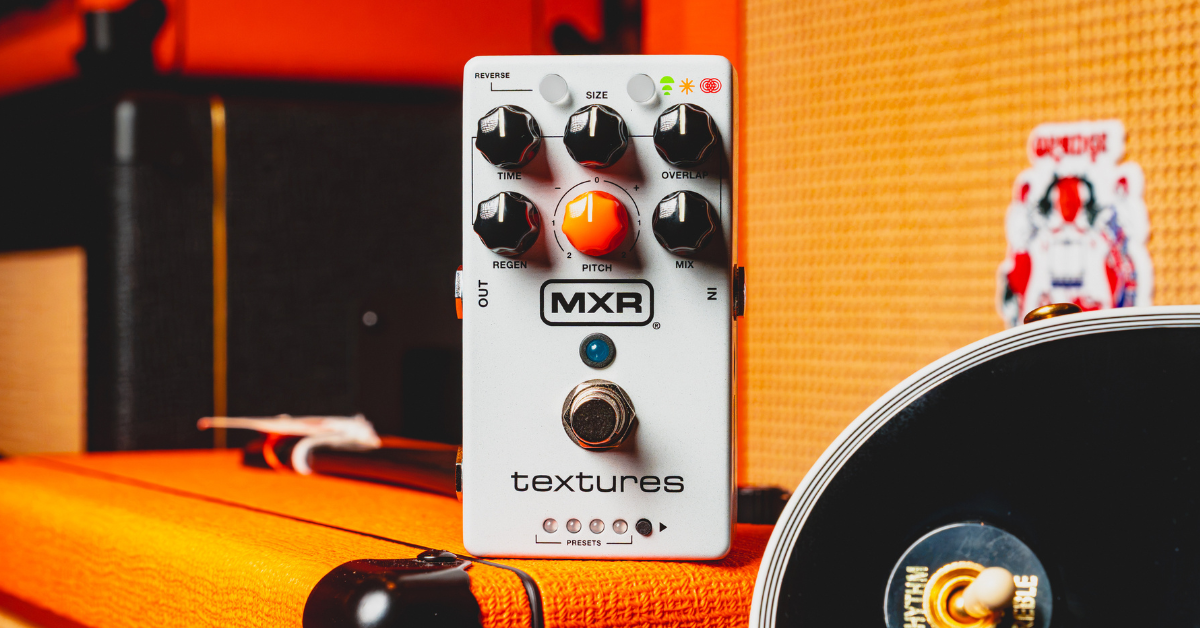
This is the MXR Textures Granular Synth Engine.
Flavor Texture
Introducing the MXR Textures Granular Synth Engine
One of those names that truly need no introduction, MXR is an institution in effect pedals. Their timeless stompboxes have driven generations of players forward in classical, rock-guitar forward ways. Ask any legendary polka-dotted or "Frakenstriped" guitarist about their Distortion+ and you'll be in the know before long.
A longtime ally to the high-gain, the stadium-ready, MXR has expanded their pool of beloved pedals in recent years to address the needs of the more cerebral, experimental-leaning pack of players. Releases like their Joshua Ambient Echo and Layers sustain pedal prove as much. These more modern-minded, high horse-powered digital creations have brought the MXR name to plenty an experimental studio rat and motherboard rig guitarist. In that same vein, today we're discussing a new creation that surely, many have been hankering for.
The MXR Textures is a granular delay and synthesizer pedal. A notable first – and honestly, surprising pick – for MXR, the Textures is the brand's take on the ambient granular delay effect. "Granular," a type of delay focused on textural tones created through deep manipulation of delay samples, is a more modern persuasion of effect. Usually the territory of more experimental and boutique brands, MXR puts their spin on the effect with Textures. A classic, clean MXR interface and an honest-to-goodness granular effect palette make Textures well worth the trip for veteran and newcomer fans of granular delay effects alike.
Paint By Texture
MXR Textures Granular Synth Engine Design and Controls
With Textures, we're getting treated to classic MXR design tenets centering a concise and concentrated granular delay experience. The brand's iconic, sleek design principles show themselves plainly with Textures for a tone-shaping and playing experience with no questions asked. Let's talk about these controls.
MXR Textures Granular Synth Engine Controls
- Mix – A classic, right? Textures offers a master mix control over its effects to allow them to be the star of the show or play a supporting role.
- Time – The delay time of repeats. Like any other delay, Textures offers control over the response time of its delayed repeats.
- Regen – The feedback amount of repeats. Capable of feeding a real soundscape, Textures carries the power behind it to forge the kind of elongated repeats needed to get truly ambient with it.
- Size – The shape of repeats. A more granular-focused control, the Size control can shrink your samples down to starry glimmers or balloon them up to blurry bursts.
- Overlap – The clarity of your sample's starts and ends. When playing with your granular samples, Overlap blurs the beginnings and ends of your playbacks to make for a blurrier, smoother haze of samples or a busier, more defined web of samples.
- Pitch – The pitch of your playbacks with a range of two octaves down to two octaves up.
- Reverse – A push-button forwards-or-backwards delay sample playback control.
- Mode – A three-way, push-button mode toggle.
Under the hood of Textures, we've got three effect modes, each offering a different flavor of ambient musicmaking. Its first mode, "Delay," is your quickest representative of a granular delay effect. This mode is represented by the button's green light. Its second mode, "Auto Freeze," is a dynamically-evolving grain pad tone that builds glitchy pads of sustain as you play. This mode's color is yellow. Finally, the third "Layers" mode throws it over to the MXR Layers pedal with a bank of four internal buffers that grab and stretch notes automatically to create interwoven tapestries of tone.
Textural Tetris
MXR Textures Granular Synth Engine Tones and Playability
Throughout the Textures and across its three modes, the name of the game is ambient-forward, soundscape-ready, textural* granular delay tones. Fire up any of Textures' three granular sampling modes and you'll be quickly met with an authentic granular effect primed to flood a signal in peculiar, glitchy resonations.
Get it?
Diamond MineThe purest representative of granular effects, click into Texture's Delay mode and you're off to the races on a granular delay. An excellent "square one" for the pedal, use this mode to inspire glimmering, shimmering delay repeats to gleam with octave-upped harmony. For something to glow like the night sky, Textures checks the box for your classic granular delay effect.
String Section SlipstreamTowards the Auto Freeze mode, Textures shows off some of its more pad-forward capabilities. Hitting up this mode with blurrier Overlap settings and lowered Pitch settings introduce slower, glazed-over playbacks that suggest an orchestral string section just on the other side of the looking-glass.
A Word from Our SponsorsUnsurprisingly, Textures excels in smooth, ambient soundscapes to set a mood. Working its Mix control back to place its granular resonations to more of an undercurrent, Textures provides a great textural backing track to film scores, sound designs, or the in-betweens in your live set.
Something worth mentioning, MXR's Textures is a very pedalboard-friendly granular effect. Owing to its origins with MXR and their historically sleek designs, Textures is certainly the granular effect to check out if you are a guitar player who always flirted with ambience and granular soundscaping. Textures' grab-and-go physical design makes it seamless to pick up and drop on your pedalboard. Its quick paths to charming granular delay tones make it a dream for guitarists looking to set-and-forget. There is a pretty loving dose of "everything you need, nothing you don't" to Textures that makes it succeed on its face, but of course, there's always more to talk about.
The Great Granular in the Sky
MXR Textures Granular Synth Engine Further Functions
The MXR Textures has plenty at the jump to make it a veritable "drag-and-drop" pedal. However, some pretty nifty MXR design goes ahead to elevate everything, if an even more robust experience is what you're after and you're looking to get a bit more granular with it*. Across the pedal's interface and under its hood, Textures blooms with smaller, finer controls and settings to help it serve as your main ambient engine.
Ba-dum tss
- Secondary Controls – While Textures features a clean six front-facing dials, a set of second parameter controls hides just beyond the riverbend. Hold down either the pedal's Reverse or Mode buttons to access two hidden secondary sets of controls including settings for onboard reverb and vibrato effects, randomization, and pitch quantization.
- Preset Bank – Keeping everything under one hood, use Texture's onboard preset bank to scroll through factory preset effect builds or your own personalized mixes for a lineup of sounds readymade for your live set.
- Stereo Routing – The MXR Textures is outfitted with TRS-ready input and output connections for use with TRS stereo cables. Just remove the pedal's bottom plate to swap it to stereo mode and work its effects right into your wild, stereo-ready rigs. What's more, a dedicated wet/dry stereo effect routing option offers unique, segmented playability.
- Expression Connection – The pedal's expression pedal connection – operable with tap switches and foot pedals – opens up Texture's playability to be controlled remotely and shaped in real-time.
MXR Textures Granular Synth Engine Final Thoughts
For long-standing fans of granular delay effects, Textures is pure MXR mojo incarnate. For newcomers to the granular game, first: Welcome! Second, Textures is a perfect gateway into wilder, more involved granular pedals but might just turn out to be your favorite granular delay on its own. A more straightforward, concise, and clean control interface offers an immediate entry point to its lush granular tones. Pedalboard warriors, motherboard mad scientists, studio soundscapers, wherever and whoever you are, Textures has something for you. Whether Textures is your first, next, or only granular effect, it delivers in patently pristine MXR fashion.