Stay glued to your TV set!
Picture this: It's 2004. Saturday night. You're finishing out the Quantum Leap marathon. You start to drift to sleep. You blink your eyes open slowly, The Guns of Navarone. You blink again, QVC. How did we end up here? We don't remember touching the remote. In fact, we haven't seen it since Friday afternoon, it seems. We've solidly drifted away and let the TV take the wheel on where we're going. It's a restless device, that cathode ray tube. It'll just keep going whether you're there or not.
Following a like ethos, the device on the docket invites you to drop in, tune out, and drift away – but don't touch that dial! We'll be right back after these messages.
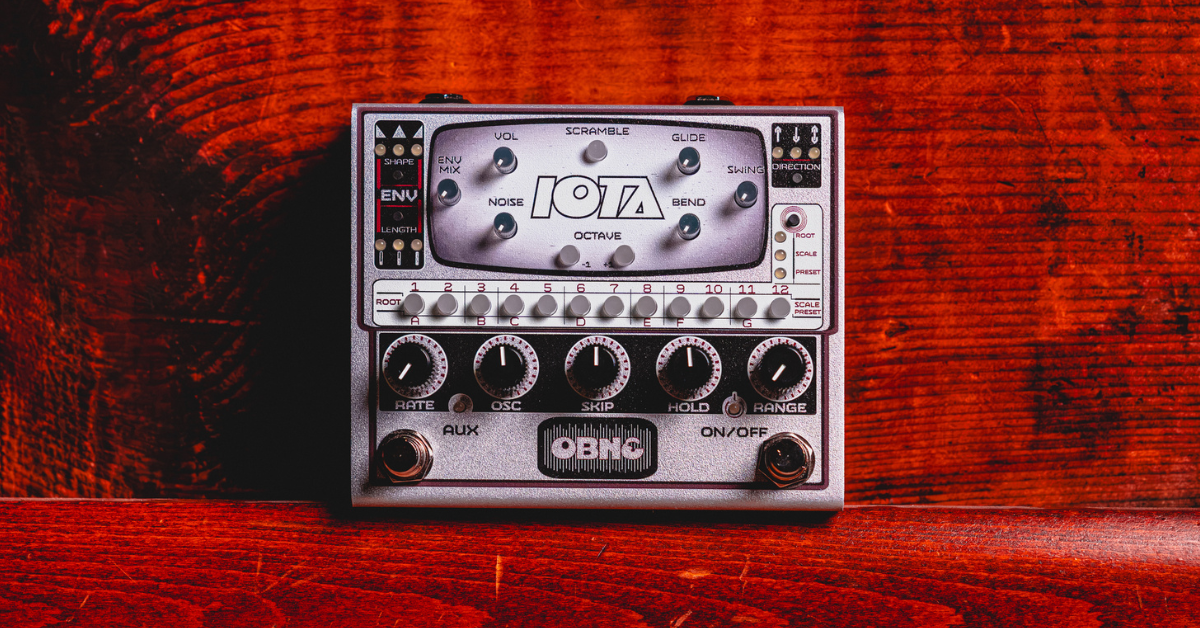
This is the Old Blood Noise Endeavors Iota Tone Generator.
Television Rules the Nation
Introducing the Old Blood Noise Endeavors Iota Tone Generator
Breaking out of their same-old, same-old, our protagonists for today, the gang at Old Blood Noise Endeavors, have broken the fourth wall today. After a 2026 peppered with exciting new developments like their Beam Splitter V2 and Setback, Old Blood has really colored outside the lines with their Iota Tone Generator. The device up at bat today is not an effect pedal. I know, right? Oklahoma's leading in truly experimental effect pedals breaks the bounds on their usual trade with the Iota.
The Iota is not an effect pedal, but a fully realized instrument. A first for Old Blood Noise Endeavors, the Iota is an automatic synthesized tone generator and sequencer. The Iota assumes the form of Old Blood's stereo pedals for a form-fitting shape to just as easily be worked into a pedalboard or synth rig. One ¼" output and one ¼" expression controller input means, for the most part, the Iota is a completely self-sustaining instrument – no guitar needed! Run the Iota out to an amplifier, DAW, or mixer, hit its "On/Off" switch, and you've got an automatically-running synth tone generator and sequencer. The Iota offers a quick and easy way to create automated synth sequences to back you up on stage, fire up a stripped-down synth rig, or just jam away, if automatic, handheld synth beats sound like a fun enough night on their own. Let's talk about it!
Broadcast News
Old Blood Noise Endeavors Iota Tone Generator Design and Controls
Approach the Iota and you might hit a small learning curve. However, get your hands on it and start hitting buttons and twisting knobs and things come together very quickly. The Iota is very easy to jam and experiment with on a more free-flowing basis, though let's get into the Iota, how it works, and how to start building synth sequences with direction. Learn the rules to break the rules, capiche?
Old Blood Noise Endeavors Iota Tone Generator Design and Controls
Alright, so run the Iota out to an amp, hit "On," turn up its Volume mini-dial and we're off. The playability of the Iota comes down to its sixteen-step push-button sequencer and its many dials. First off, we decide our playability mode. The Iota comes ready with three playability modes: root, scale, and preset. On root, you choose one note and the Iota builds up automated sequences around it. On scale, the Iota opens up, allowing you to choose more than one note to run through your sequence. On preset, the Iota turns to onboard presets either pre-built or manually programmed.
The Iota automatically plays its sequenced notes once it's switched on. From there, we have a wide selection of dials to shape different parameters of the synthesized sequence and the synthesized tone. Let's get specific.
- Rate – The speed of the sequencer playback. Clockwise for faster, counterclockwise for slower.
- Oscillator – The blend of your synth oscillator's wavetables. In essence, this knob blends between different synth tone voicings with a fuller, darkwave sine wave before noon, a thinner, chiptune wave past noon, and the cleanest mix at noon.
- Skip – The frequency with which notes in a sequence will be skipped over. At noon, no notes are skipped. Before noon, notes are skipped on predetermined patterns programmed in the Iota. After noon, notes are skipped randomly with increasing frequency.
- Hold – The frequency with which notes in a sequence will be repeated. At noon, no notes are repeated. Before noon, notes are held on predetermined patterns. After noon, notes are held randomly.
- Range – The number of notes played in a sequence. Start at the knob's minimum to hear one note played in a sequence, no matter how many you have programmed, and turn up slowly to hear another note, and then another, and then another.
- Glide – The smoothness in note changes. At zero, notes will start and stop in between one another. Turned up, notes in a sequence will "glide" between each other, gradually blurring the ends of notes, eventually simulating one unstopping tone gliding from note to note.
- Swing – The amount of swing in the sequence. At zero, notes will play in a regimented rhythm, one after another. Turned up, that rhythm will offset for funkier rhythmic sequences.
- Bend – The amount of note vibrato in the sequence. At zero, notes will play with no vibrato. Turned up, more vibrato effect will be added to notes.
- Noise – The amount of noise in the synth oscillator. Like any great synth, the Iota can mix in noise to its synthesized tones for a bit of authentic analog distortion and percussive character.
- Envelope – The Iota additionally comes equipped with an onboard envelope filter. Two push-button controls swap the envelope's shape and intensity for different flavors of envelope filter shaping and sound. The envelope can be zeroed out by minimizing the Envelope Mix dial
- Direction – A push-button order control for your sequence. Hit this button to send your sequence upwards, downwards, or back and forth.
- Scramble – A push-button randomizer for your sequence. Hit this button to shake up the order of your synth tones from your root or scale modes.
- Octave – A push-button octave-up or octave-down for raising or lowering the voice of your sequence.
Alright, that's a lot of controls. Where are we going with them?
Don't Touch that Dial
Old Blood Noise Endeavors Iota Tone Generator Tones and Playability
Grab hold of the Iota – cradle it in your hands if you feel so inclined – and we're off to the races pretty immediately. The Iota instantly performs with authentic mono synth tonality. Bright and charming synth notes pour out of the Iota with a wide range of speeds. Turn the Iota's Rate control for a steady backbeat of sequenced notes or a proper synth pop lead line. Playability comes to life seamlessly on either of the pedal's two main modes. When on Root, the Iota performs for you with logical root note ranges. Choose a note from any listed next to the sixteen sequence buttons and you're off. Looking for a little more freedom to jam, wild out, and let the chips fall where they may? Hit scale and start hitting note buttons to add to your sequence. Either way, the Iota performs fluidly with great sound, making a great-sounding sequence whether you're carefully crafting a melody or thinking out loud.
Tonality is easily and expressively shaped by the Iota's oscillator and envelope functions. Work the Oscillator dial and get thumping synthwave tones, chirping 8-bit tones, or plenty in between! The Iota's blissfully simple envelope gets right down to business to inject variance in rhythmic character for choppy volume cuts to doubled pseudo-backbeats. When looking for more variance in order and rhythm, the Iota's Skip and Hold dials present that kind of quick toss-up to the mix for functions to spice up sounds but also be worked backward to make more informed musical decisions.
The Iota can produce reliable and authentic synthesizer tones to get along to friendly synth mixes. However, start working with its Bend, Swing, Noise, and Glide controls and things can start getting slippery. Couple these pitch and rhythm variance controls with the Range control and introduce more outlandish synth sequences with greater weirdo character and variability.
"Why, Iota!"
Old Blood Noise Endeavors Iota Tone Generator Further Functions
Unlike so many other great Old Blood creations, the Iota is not an effect pedal. Like so many other great Old Blood creations, the Iota is outfitted with great functions for connection and control. Let's run down a few.
- Tap Tempo – Maybe you're a guitarist who likes to throw some quick synth lines in your set. Use the Iota's Aux footswitch to tap a tempo and keep its sequences up with whatever you need it for!
- Expression/MIDI Control – If you're looking to build the Iota into a synth rig, the Iota features a ¼" MIDI connection and 1/8" MIDI inputs and outputs for building into your extensive, remotely-controlled rig.
- Presets – To get really in the weeds with your sequencing, the Iota features twelve programmable onboard preset slots and over a hundred more available over MIDI.
- Stereo Output – That's right! Bring the Iota's quick sequences to both sides of the room with a stereo-ready ¼" output.
- Standard Power – While the Iota is not an Old Blood Noise Endeavors effect pedal, you can just as easily power it like one with a standard nine-volt DC center negative pedal power supply!
Old Blood Noise Endeavors Iota Tone Generator Final Thoughts
For Old Blood fans, the Iota is certainly something to celebrate. For newcomer fans to OBNE's ever-evolving endeavor, the same still applies. A blissfully simple box of authentic synthesized tones to drive a sequence forward, the Iota fills an impactful space in any synthesist hopeful's rig. The Iota bridges a gap for synth appreciators to create great sequences full of charm and character. For an automated synthesizer as simple or as complex as you'd like to make it, the Iota delivers on many, many levels. The Iota proves Old Blood still has plenty of tricks up their sleeve – and thank goodness for that!